

Haibao

Bilingual AI subtitles for videos without captions.

Haibao generates bilingual subtitles on Mac, iPhone, and iPad with privacy-first on-device AI

Before you download
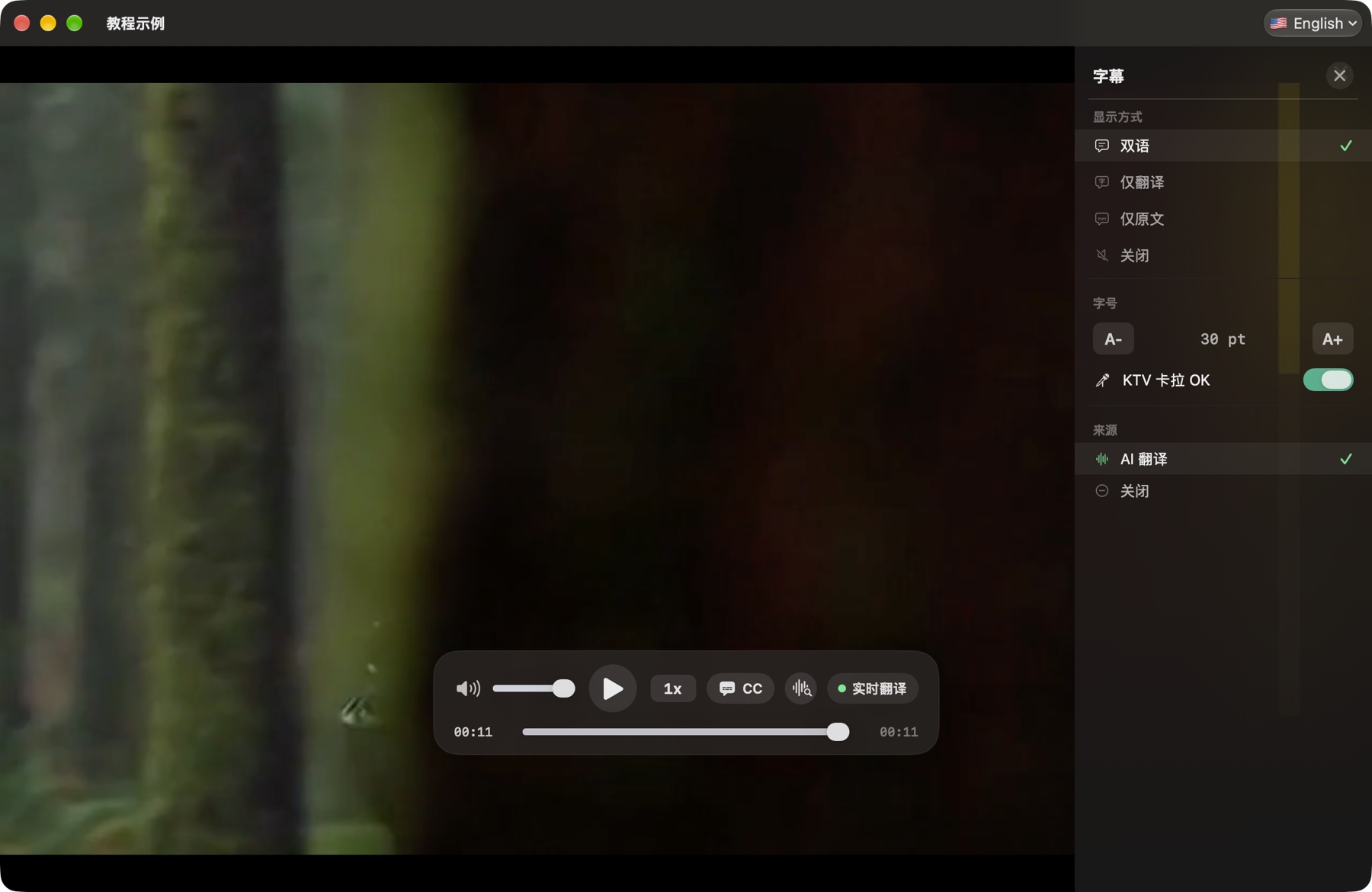
Actual Haibao Mac subtitle settings with bilingual, translation and original options, in Chinese
Guide in Chinese · Screenshot version 1.3.4

REAL APP DEMO

From lost to following along.

A generated story scene switches into the real Haibao Mac app, where on-device AI creates word-level subtitles and a Chinese translation.

The opening story scene is AI-generated. The player and subtitles are recorded from the real Haibao app.

Haibao for Mac

Open a local video, choose the spoken and target languages, and watch with original and translated subtitles generated on your Mac.

  • Local video playback

    Open common video formats from your Mac, Downloads folder, or folders you choose.

  • Bilingual AI subtitles

    Generate speech subtitles and display the original and translated text together.

  • Private by design

    Local media, subtitle text, and translations are not uploaded to cloud AI services.

More than a subtitle overlay

  • Your own User TV URLs

    Add an authorized HTTP/HTTPS live URL, such as HLS, for live AI captions and translation. User TV is free; no channels, catalog, or playlist imports are supplied.

  • Media browsing and controls

    Browse recent media and Downloads, drag files into the app, use keyboard shortcuts, and adjust subtitle sources and display.

  • Speech models and language packs

    Choose local speech models and prepare translation language packs in Settings; performance depends on your Mac and the source.

  • Common formats, not every codec

    Recognizes MP4, MOV, MKV, AVI, WebM and common audio formats. Local matching SRT and network SRT/VTT subtitles depend on the source; file extensions do not guarantee codec compatibility.

Your video stays on your Mac

Core speech recognition and subtitle translation use on-device processing. Haibao does not upload your local video, file path, transcript, or translation to a cloud AI service.

macOS 26.2 or later. Apple silicon is recommended for AI performance. Feature availability depends on version and media compatibility.

Haibao for Mac

Haibao for iPhone and iPad

Bring videos in from Files or a computer on the same Wi-Fi network, then generate original and translated subtitles on your device.

  • Files and Wi-Fi import

    Import from the Files app or transfer large videos from a computer on the same network.

  • Bilingual AI subtitles

    Generate subtitles from the audio track and translate them with on-device language packs.

  • No cloud AI account

    Local playback and core AI subtitle processing do not require uploading your media.

Import, watch, and understand

  • Your own User TV URLs

    Add authorized HTTP/HTTPS live streams for real-time AI captions and translation. User TV is free; the app supplies no channel catalog, browser, or playlist import.

  • Files and Wi-Fi Transfer

    Import video, audio, and SRT/VTT subtitles from Files or transfer larger media from a computer on the same network.

  • Subtitle controls and recent media

    Choose source/target languages and subtitle size, switch sources, and return to recently played media. Local playback needs no cloud AI account.

  • Native playback with fallback

    AVPlayer handles native media with a VLC-based fallback for less common formats. Recognized extensions do not guarantee all codecs or embedded subtitle tracks.

Local media remains on your device

Haibao does not upload local video files, file paths, subtitle text, or translations to cloud AI services. Network access is still used for App Store services, optional analytics, and resources described in the privacy policy.

iOS/iPadOS 26.0 or later. Model preparation and translation support depend on the device and languages; Plus options and limits are described in the App Store.

Haibao for iPhone and iPad

Is it a good fit for you?

You watch your own foreign-language videos, lectures or interviews and want on-device media and subtitle processing.

Before you get started

Mac requires macOS 26.2+; iPhone and iPad require iOS or iPadOS 26.0+. Results depend on your device, languages and recording.

Before you download

Practical answers about what the app does, and what it does not promise.

Can I generate bilingual subtitles for a video with no captions?

Yes. Open a video you are authorized to watch, prepare the required speech model and translation language packs, and choose the spoken and target languages. Haibao generates original and translated captions during playback; accuracy and speed depend on the device, languages and recording.

Does AI subtitle translation upload my video?

Core speech recognition and subtitle translation run on device. Local video, file paths, transcripts and translations are not uploaded to cloud AI. Resource preparation, App Store services, streams and optional analytics can still use the network; on-device AI does not mean the whole app never connects.

Should I choose the Mac or iPhone and iPad app?

Choose Mac for local desktop files, media browsing and keyboard controls. Choose iPhone and iPad for mobile viewing, Files imports or transfers from a computer on the same trusted Wi-Fi network. System requirements and available capabilities differ by platform.

Real apps. Real getting-started steps.

See setup and everyday workflows in published illustrated guides. Articles are in their original Chinese; screenshot versions and example-data notes are disclosed in each article.